WooCommerce Shipping Plugin Distance Based — Best Free Option 2026
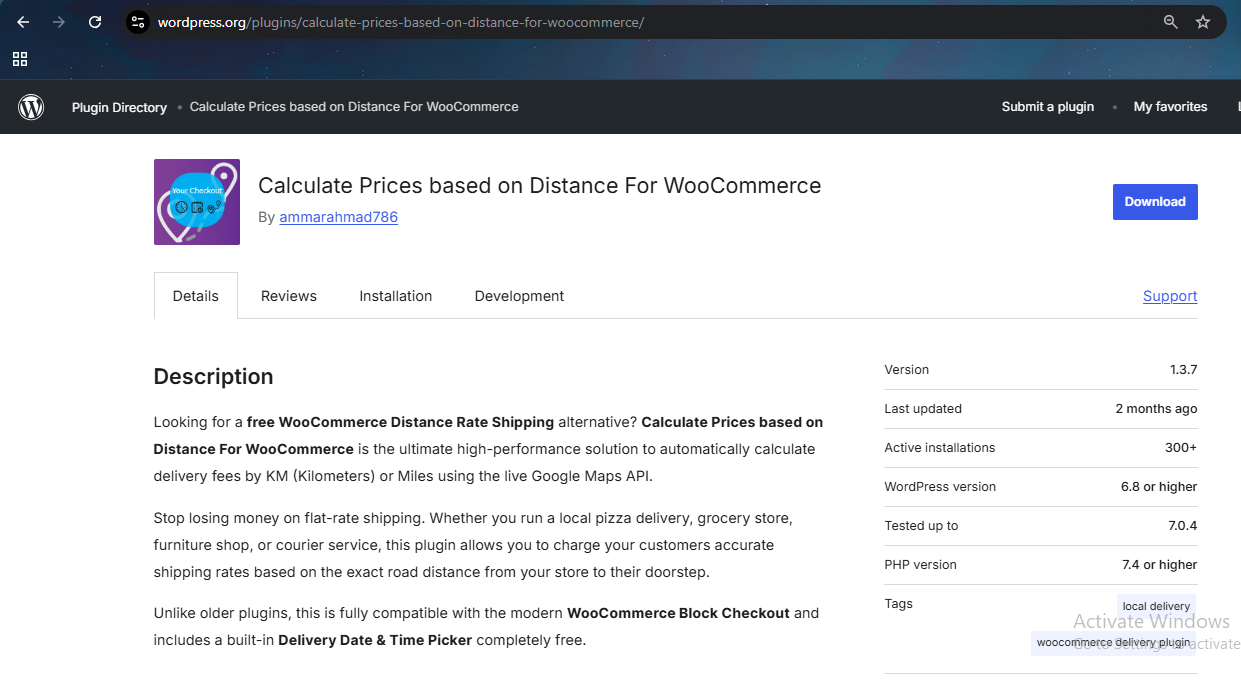
Looking for the best WooCommerce shipping plugin distance based on real driving distance? The Calculate Prices Based on Distance for WooCommerce plugin is the ultimate WooCommerce shipping plugin distance based solution for businesses offering local delivery, food delivery, grocery delivery, and more — completely free to get started.Below is the plugin page on wordpress.org
Table of Contents
Why Use a WooCommerce Shipping Plugin Distance Based?
Top Features
Use Cases by Industry
Setup Guide
Why Choose RoutePricing
FAQ
Why Use a WooCommerce Shipping Plugin Distance Based?
Traditional WooCommerce shipping plugins rely on flat rates or postal zones, which often result in unfair delivery costs. A WooCommerce shipping plugin distance based on real driving distance ensures accurate, real-world pricing, making your delivery services fair and efficient for every customer order.
According to BigCommerce research, stores using distance based pricing see up to 23% fewer abandoned carts compared to flat rate shipping.
Top Features of This WooCommerce Shipping Plugin Distance Based Solution
Free Version Features
Accurate Distance Shipping Calculation – Automatically calculates shipping costs based on real-world driving routes via Google Maps.
Charge Per Kilometer (KM) or Mile – Seamlessly switches between Metric and Imperial units to match your regional delivery setup.
Google Maps Address Autocomplete – Speeds up user checkout and stops failed deliveries by suggesting verified addresses in real time.
Free Delivery Datepicker & Timepicker – Let customers schedule their preferred local delivery day and time slot right on the checkout page.
Live Dynamic Shipping Rates – Customers see their delivery fees adjust instantly as they type their delivery address.
WooCommerce Blocks & Classic Checkout Support – Works flawlessly with traditional checkout pages and the new modern Gutenberg Cart/Checkout blocks.
Advanced Features in PRO Version
* Tiered Distance Pricing Rules – Set up complex brackets (e.g., $5 flat for 0–5 KM, then $1.50 per additional KM up to 15 KM).
* Maximum Delivery Radius Restriction – Set a hard mileage or KM limit to block orders from customers living outside your delivery zone.
* Store-to-Store & Custom Dual Addresses – Calculate delivery rates between two completely custom locations (perfect for point-to-point courier services).
* White-Label Custom Admin Labels – Change checkout text fields and delivery fee labels to match your store’s branding perfectly.
* Free Delivery Threshold by Cart Total – Offer free shipping by distance once a user spends a specific amount (e.g., Free delivery over $100 within a 10km radius).
* Force Checkout Address Verification – Prevent orders from processing until an accurate distance rate has been queried.
Use Cases for the WooCommerce Shipping Plugin Distance Based on Google Maps
Whether you run a restaurant, flower shop, furniture store, or a local delivery service, this WooCommerce shipping plugin distance based solution helps calculate the exact cost of each delivery.
🍕 Restaurants — Deliver hot meals with accurate per km pricing
🛒 Grocery Stores — Fair distance based pricing for local customers
🛋️ Furniture Delivery — Avoid overcharging on long-distance deliveries
🚚 Courier Services — Calculate delivery between two locations
🌸 Florists — Same-day local delivery with automatic distance fees
Setup Guide for WooCommerce Shipping Plugin Distance Based
Start by installing the free WooCommerce shipping plugin distance based version from WordPress.org. Then follow our complete setup tutorials:
Why Choose RoutePricing WooCommerce Shipping Plugin Distance Based
With 300+ active installs and a 4.8 star rating on WordPress.org, RoutePricing’s WooCommerce shipping plugin distance based solution is trusted by businesses around the globe. Our plugin is constantly updated to stay compatible with the latest WooCommerce and WordPress versions.
Key Benefits:
✅ Reduce cart abandonment with upfront shipping rates
✅ Improve delivery accuracy and pricing fairness
✅ Fully integrated with WooCommerce checkout flow
✅ Compatible with Elementor, Divi, Gutenberg, and other builders
✅ Save $100+ per year vs the official $150 USD plugin
✅ Free version available on WordPress.org
What is the best WooCommerce shipping plugin distance based on Google Maps?
Calculate Prices Based on Distance For WooCommerce by RoutePricing. It uses Google Maps to calculate the exact driving distance and applies your preset delivery fee automatically at checkout. Free version available on WordPress.org.
Is this WooCommerce shipping plugin distance based solution free?
Yes. The core plugin is completely free on WordPress.org. PRO version with tiered pricing and advanced features is available at $49.99 CAD per year.
Does this WooCommerce shipping plugin distance based work with Block Checkout?
Yes. The plugin is fully compatible with both Classic and Block-based WooCommerce checkout unlike many competitor plugins.
How accurate is the WooCommerce shipping plugin distance based calculation?
Very accurate. The plugin uses Google Routes API to calculate the exact real driving distance between your store and the customer’s address — not straight-line distance.
Can I set tiered pricing with this WooCommerce shipping plugin distance based solution?
Yes. The PRO version supports tiered distance pricing brackets. For example $5 for 0-5km, $10 for 5-15km, $15 for 15-25km and so on.
Transform Your Store With the Best WooCommerce Shipping Plugin Distance Based Solution
Whether you are offering local food delivery or shipping bulky furniture, RoutePricing’s WooCommerce shipping plugin distance based solution gives you the flexibility, accuracy, and control needed to grow your business. Eliminate guesswork, offer transparent pricing, and delight your customers with smart shipping solutions tailored to your store.
We use cookies to improve your experience on our site. By using our site, you consent to cookies.
This website uses cookies
Websites store cookies to enhance functionality and personalise your experience. You can manage your preferences, but blocking some cookies may impact site performance and services.
Essential cookies enable basic functions and are necessary for the proper function of the website.
Name
Description
Duration
Cookie Preferences
This cookie is used to store the user's cookie consent preferences.
30 days
These cookies are needed for adding comments on this website.
Name
Description
Duration
comment_author
Used to track the user across multiple sessions.
Session
comment_author_email
Used to track the user across multiple sessions.
Session
comment_author_url
Used to track the user across multiple sessions.
Session
Statistics cookies collect information anonymously. This information helps us understand how visitors use our website.
Google Analytics is a powerful tool that tracks and analyzes website traffic for informed marketing decisions.
Contains custom information set by the web developer via the _setCustomVar method in Google Analytics. This cookie is updated every time new data is sent to the Google Analytics server.
2 years after last activity
__utmx
Used to determine whether a user is included in an A / B or Multivariate test.
18 months
_ga
ID used to identify users
2 years
_gali
Used by Google Analytics to determine which links on a page are being clicked
30 seconds
_ga_
ID used to identify users
2 years
_gid
ID used to identify users for 24 hours after last activity
24 hours
_gat
Used to monitor number of Google Analytics server requests when using Google Tag Manager
1 minute
_gac_
Contains information related to marketing campaigns of the user. These are shared with Google AdWords / Google Ads when the Google Ads and Google Analytics accounts are linked together.
90 days
__utma
ID used to identify users and sessions
2 years after last activity
__utmt
Used to monitor number of Google Analytics server requests
10 minutes
__utmb
Used to distinguish new sessions and visits. This cookie is set when the GA.js javascript library is loaded and there is no existing __utmb cookie. The cookie is updated every time data is sent to the Google Analytics server.
30 minutes after last activity
__utmc
Used only with old Urchin versions of Google Analytics and not with GA.js. Was used to distinguish between new sessions and visits at the end of a session.
End of session (browser)
__utmz
Contains information about the traffic source or campaign that directed user to the website. The cookie is set when the GA.js javascript is loaded and updated when data is sent to the Google Anaytics server
6 months after last activity
Marketing cookies are used to follow visitors to websites. The intention is to show ads that are relevant and engaging to the individual user.
A video-sharing platform for users to upload, view, and share videos across various genres and topics.
Registers a unique ID on mobile devices to enable tracking based on geographical GPS location.
1 day
VISITOR_INFO1_LIVE
Tries to estimate the users' bandwidth on pages with integrated YouTube videos. Also used for marketing
179 days
PREF
This cookie stores your preferences and other information, in particular preferred language, how many search results you wish to be shown on your page, and whether or not you wish to have Google’s SafeSearch filter turned on.
10 years from set/ update
YSC
Registers a unique ID to keep statistics of what videos from YouTube the user has seen.
Session
DEVICE_INFO
Used to detect if the visitor has accepted the marketing category in the cookie banner. This cookie is necessary for GDPR-compliance of the website.
179 days
LOGIN_INFO
This cookie is used to play YouTube videos embedded on the website.
2 years
VISITOR_PRIVACY_METADATA
Youtube visitor privacy metadata cookie
180 days
You can find more information in our Privacy Policy and .

 Free Version Features
 Advanced Features in PRO Version