
Finding the best WooCommerce delivery pricing plugin matters more than most store owners realize, because local businesses need specialized woocommerce shipping calculation solutions designed for neighborhood deliveries rather than complex enterprise shipping needs. The right plugin eliminates shipping charges woocommerce guesswork while ensuring every delivery remains profitable and fairly priced through accurate woocommerce shipping cost determination.
What Makes the Best WooCommerce Delivery Pricing Plugin for Local Businesses
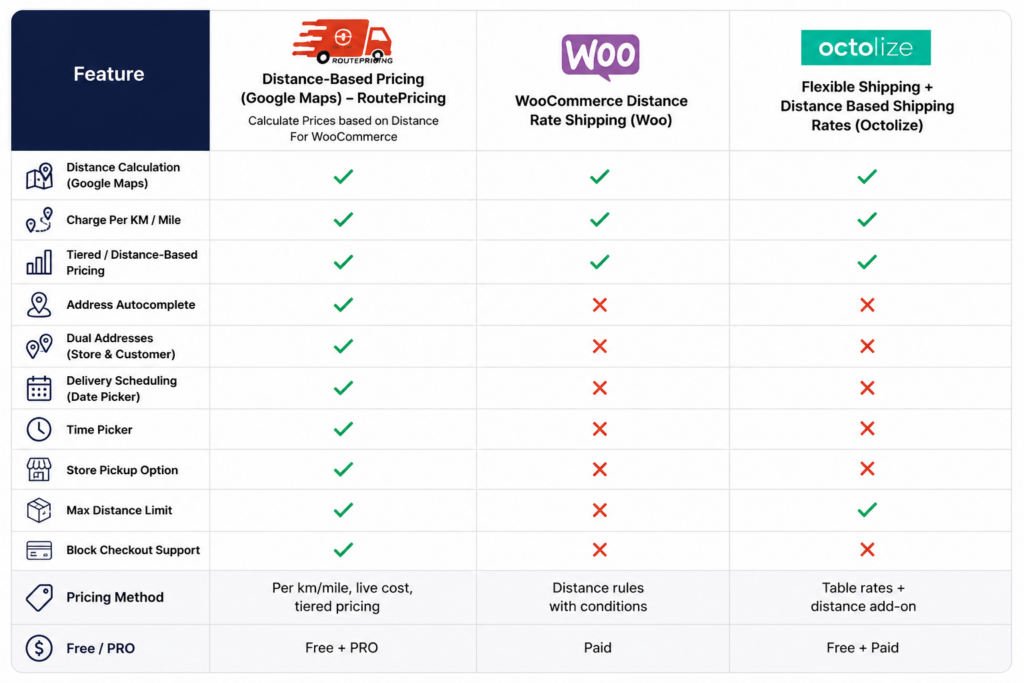
Not every shipping plugin is built with local delivery in mind. The best WooCommerce delivery pricing plugin for a local business needs three things: real driving distance instead of zone guesses, fast setup without a developer, and full compatibility with modern checkout. Here’s what to look for and why Calculate Prices Based on Distance For WooCommerce checks every box.
Why Calculate Prices Based on Distance Plugin Leads the Local Market
The Calculate Prices based on Distance For WooCommerce plugin specializes exclusively in local delivery challenges, offering Google Maps integration and flexible woocommerce shipping fees models that understand neighborhood business patterns. Unlike generic shipping plugins, this focuses on woocommerce distance rate shipping accuracy that local customers appreciate and trust — a key reason it stands out as the best WooCommerce delivery pricing plugin for stores serving a defined local area.
Key Benefits for Local Delivery Businesses:
Free vs Pro Features
Free Version – Download Now
- Distance-based pricing calculation for accurate woocommerce shipping cost
- Google Maps address autocomplete for better woocommerce shipping calculation
- Customizable per-mile/km charges for flexible woocommerce distance rate shipping
- Delivery date/time picker for improved customer experience
- Live calculation display at checkout showing shipping price woocommerce
Pro Version – Buy Now
- Advanced Pricing Rules – Create tiered pricing brackets (e.g., $5 for 0–5 KM, $10 for 5–15 KM)
- Maximum Delivery Distance – Restrict deliveries beyond a certain radius
- Dual Address Fields – Allow pricing between two locations (e.g., pickup & drop-off)
- Priority Handling & Advanced Scheduling – Set time slot limits, preparation times, and lead times
- Admin Label Customization – Rename plugin labels for better customer UI experience
Setup Guide
Start by installing the free plugin from WordPress.org. Then follow our complete setup tutorials:
Step 1: Get your Google Maps API Key
Step 2: Configure your plugin for distance-based shipping
Step 3: Enable PRO features like tiered pricing
Learn how our plugin works.
Test the Plugin Live (Free vs PRO Comparison): Try Live Demo
Video Walkthrough
See why this is considered the best WooCommerce delivery pricing plugin for local businesses in action:
FAQ: Best WooCommerce Delivery Pricing Plugin
Q: Is this suitable for food delivery businesses? A: Yes, perfect for restaurants, groceries, and any local delivery service.
Q: Can I integrate with existing shipping methods? A: Yes, the plugin complements existing WooCommerce shipping methods without conflicts.
Q: Do I need technical support during setup? A: Most users complete setup independently in 15 minutes using the step-by-step guide.
Q: Why is this the best WooCommerce delivery pricing plugin for local businesses specifically? A: Because it’s built entirely around real driving distance rather than generic zones, which is exactly what local, distance-sensitive deliveries need.
Get started today with the free version or contact support for personalized local business consultation.