
WooCommerce Google Maps Address Autocomplete — Free Plugin 2026
Adding WooCommerce Google Maps address autocomplete to your checkout page reduces failed deliveries, speeds up customer checkout, and enables automatic distance-based delivery fee calculation — all completely free. This guide shows you exactly how to set up WooCommerce Google Maps address autocomplete in under 10 minutes with no coding required.
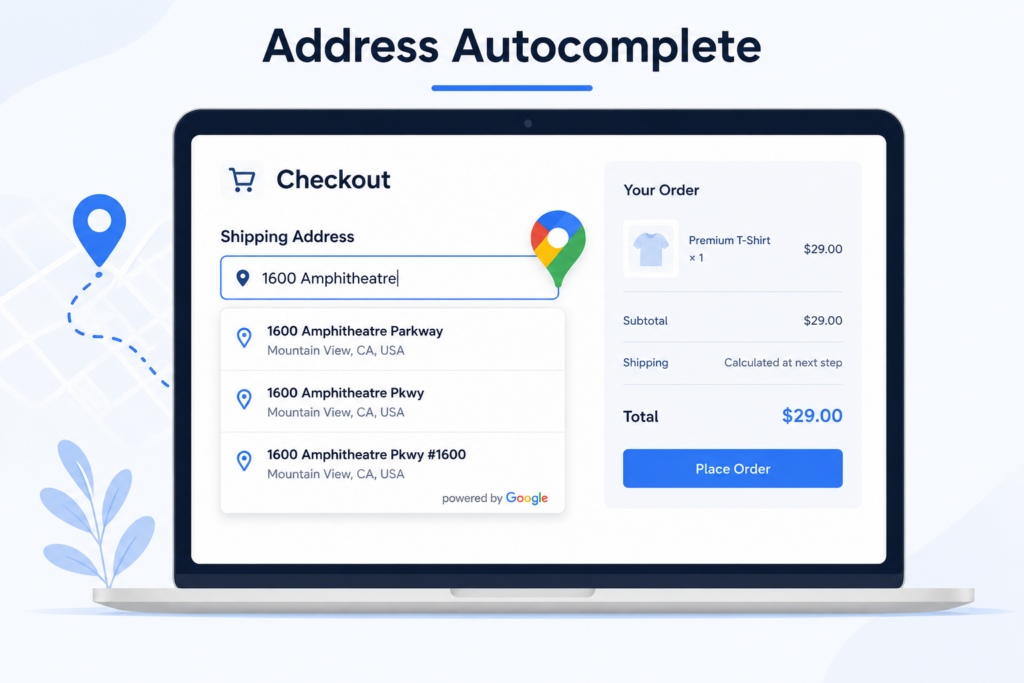
Table of Contents
- What is WooCommerce Google Maps Address Autocomplete
- Why Your Store Needs It
- Free vs PRO Features
- How to Set Up Google Maps Address Autocomplete
- How It Works at Checkout
- FAQ
What is WooCommerce Google Maps Address Autocomplete
WooCommerce Google Maps address autocomplete is a feature that suggests verified addresses to customers as they type in the delivery address field at checkout. Instead of manually typing their full address, customers simply start typing and Google Maps instantly shows matching verified addresses to select from.
This eliminates typos, wrong addresses, and failed deliveries — saving you time and money on every single order.
Why Your WooCommerce Store Needs Google Maps Address Autocomplete
Without WooCommerce Google Maps address autocomplete your store faces these common problems:
❌ Customers type wrong addresses at checkout
❌ Failed deliveries cost you time and money
❌ Manual address correction wastes hours every week
❌ Customers abandon checkout due to slow address entry
❌ Distance calculation fails with incorrect addresses
With WooCommerce Google Maps address autocomplete:
✅ Customers select verified addresses instantly
✅ Zero failed deliveries due to wrong addresses
✅ Checkout speed increases significantly
✅ Distance calculation works accurately every time
✅ Delivery fees are calculated automatically
According to Baymard Institute research, complicated checkout processes cause 17% of customers to abandon their cart. Read the full research here.
Free vs PRO Features of the plugin
Free Version:
✅ Google Maps Address Autocomplete — Real-time verified address suggestions at checkout
✅ Distance Based Delivery Fee — Automatically calculate fee using Google Maps
✅ Charge Per KM or Mile — Fully customizable delivery charges
✅ Delivery Date and Time Picker — Let customers choose delivery slots
✅ Live Calculation Display — Customers see exact fee instantly
✅ Block and Classic Checkout — Compatible with both checkout types
PRO Version:
⚡ Tiered Distance Pricing — Different fees for different distance ranges
⚡ Maximum Delivery Radius — Restrict deliveries beyond a set distance
⚡ Dual Address Fields — Price between two custom locations
⚡ Free Delivery Threshold — Waive fee above a cart total
⚡ Force Address Verification — Prevent orders without verified address
⚡ Admin Label Customization — Rename checkout fields to match your brand
How to Set Up WooCommerce Google Maps Address Autocomplete
Start by installing the free plugin from WordPress.org.
Step 1: Get your Google Maps API Keys — you’ll need a Public key (for autocomplete) and a Private key (for distance calculation).
Step 2: Configure the plugin — enter your API keys, store address, and price per KM/Mile under WooCommerce → WC Distance Calculator.
Step 3: Visit your checkout page and start typing an address — Google Maps autocomplete suggestions will appear instantly.
Want tiered pricing, delivery radius limits, or dual-address support? See PRO features.
How WooCommerce Google Maps Address Autocomplete Works at Checkout
Here is exactly what your customers experience with WooCommerce Google Maps address autocomplete enabled:
1️⃣ Customer reaches checkout page
2️⃣ Customer starts typing their delivery address
3️⃣ Google Maps instantly suggests verified matching addresses
4️⃣ Customer selects their address from the dropdown
5️⃣ Customer clicks Calculate Delivery Fee button
6️⃣ Google Maps calculates exact driving distance
7️⃣ Delivery fee is applied automatically to order total
8️⃣ Customer places order with correct verified address
The entire process takes under 30 seconds and eliminates all address errors completely.
Watch the Tutorial to see plugin in action
WooCommerce Google Maps Address Autocomplete FAQ
Is WooCommerce Google Maps address autocomplete free?
Yes. Our plugin is completely free on WordPress.org and includes Google Maps address autocomplete. Google Maps API offers 10,000 free requests per month — most small stores never pay anything.
Does WooCommerce Google Maps address autocomplete work with Block Checkout?
Yes. Our plugin is fully compatible with both Classic and Block-based WooCommerce checkout — unlike many older plugins that only support classic checkout.
Can address autocomplete also calculate delivery fees?
Yes. Once a customer selects their verified address using autocomplete, they click Calculate Delivery Fee and Google Maps automatically calculates the exact driving distance and applies your preset delivery fee instantly.
What happens if Google Maps API limit is exceeded?
If limit exceeded, Google charges approximately $0.017 per additional request.
Does it prevent orders with wrong addresses?
The PRO version includes a Force Address Verification feature that prevents customers from placing orders until they have selected a verified address and calculated their delivery fee.
Start Using WooCommerce Google Maps Address Autocomplete Today
Stop losing money on failed deliveries due to wrong addresses. Add WooCommerce Google Maps address autocomplete to your checkout for free and calculate accurate delivery fees automatically.
More resources: How it works · Free setup guide · PRO configuration · Why choose us
Last Updated: August 2026