
Delivery Pricing by ZIP Code vs Distance: A Complete WooCommerce Comparison
Delivery pricing by zip code vs distance is one of the most important decisions a local delivery store makes, because it directly impacts pricing accuracy, customer satisfaction, and operational efficiency. The method you select determines whether customers receive fair woocommerce shipping fees pricing or experience frustration from arbitrary boundaries that don’t reflect actual woocommerce shipping cost delivery costs.
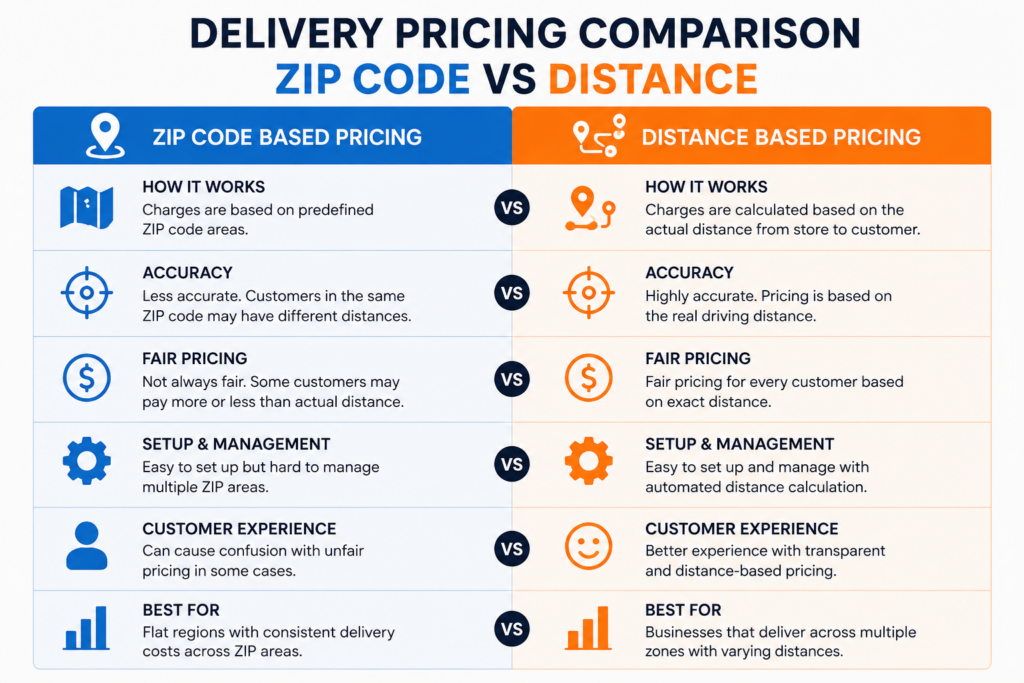
Delivery Pricing by ZIP Code vs Distance: Side-by-Side Comparison
Why Delivery Pricing by ZIP Code vs Distance Matters for Your Store
ZIP codes were never designed for shipping pricing — they were designed for mail routing, so their boundaries are often uneven. A customer just outside a ZIP boundary might be closer than one well inside it, yet the ZIP method charges them completely different rates. This is the core weakness in delivery pricing by zip code vs distance: ZIP zones don’t reflect real driving routes, while distance-based pricing calculates the exact road distance between your store and the customer, so every fee reflects the actual delivery effort involved.
How the Calculate Prices Based on Distance Plugin Solves ZIP Code Problems
The Calculate Prices based on Distance For WooCommerce plugin eliminates ZIP code limitations by calculating exact distances using Google Maps APIs, ensuring every woocommerce shipping fees reflects actual delivery requirements rather than arbitrary postal boundaries through precise shipping cost woocommerce determination. Instead of drawing zones by hand and hoping they’re fair, the plugin calculates a live driving route for every single order.
Free vs Pro Features of the plugin
Free Version – Download Now
- Accurate Distance Shipping Calculation – Automatically calculates shipping costs based on real-world driving routes via Google Maps.
- Charge Per Kilometer (KM) or Mile – Seamlessly switches between Metric and Imperial units to match your regional delivery setup.
- Google Maps Address Autocomplete – Speeds up user checkout and stops failed deliveries by suggesting verified addresses in real time.
- Free Delivery Datepicker & Timepicker – Let customers schedule their preferred local delivery day and time slot right on the checkout page.
- Live Dynamic Shipping Rates – Customers see their delivery fees adjust instantly as they type their delivery address.
- WooCommerce Blocks & Classic Checkout Support – Works flawlessly with traditional checkout pages and the new modern Gutenberg Cart/Checkout blocks.
Pro Version – Buy Now
- Advanced Pricing Rules – Create tiered pricing brackets (e.g., $5 for 0–5 KM, $10 for 5–15 KM)
- Maximum Delivery Distance – Restrict deliveries beyond a certain radius
- Dual Address Fields – Calculate delivery rates between two completely custom locations (perfect for point-to-point courier services)
- Free Delivery Threshold by Cart Total – Offer free shipping by distance once a user spends a specific amount (e.g., Free delivery over $100 within a 10km radius)
- Admin Label Customization – Rename plugin labels for better customer UI experience
- Force Checkout Address Verification – Prevent orders from processing until an accurate distance rate has been queried.
Setup Guide
Start by installing the free plugin from WordPress.org. Then follow our complete setup tutorials:
Step 1: Get your Google Maps API Key
Step 2: Configure your plugin for distance-based shipping
Step 3: Enable PRO features like tiered pricing
Learn how our plugin works.
Video Walkthrough
Watch this quick walkthrough to see plugin in action:
FAQ: Delivery Pricing by ZIP Code vs Distance
Q: Does it work with WooCommerce Block checkout? A: Yes, compatible with both Classic and Block-based checkout flows.
Q: Can I use kilometers instead of miles? A: Yes, you can choose your preferred distance unit (km or miles) in settings.
Q: Is Google Maps API free to use? A: Google requires billing setup but provides free monthly credits covering most small businesses.
Q: Does it work with all WooCommerce themes? A: Yes, designed to be compatible with all major WooCommerce themes and page builders.
If you’re still weighing delivery pricing by zip code vs distance for your own store, the distance-based method scales better as you add customers further from your original zones. Start with the free plugin or contact support for personalized shipping cost woocommerce consultation.