
Distance Based Shipping WooCommerce — Free No-Code Setup Guide 2026
Setting up distance based shipping WooCommerce provides fair pricing for local deliveries without requiring any programming expertise. This free step-by-step guide shows you exactly how to set up distance based shipping WooCommerce using a visual interface — no coding required at any step.
Table of Contents
- How Distance Based Shipping WooCommerce Works
- Manual Coding vs No-Code Solution
- Free vs PRO Features
- Step-by-Step Setup Guide
- FAQ
How Distance Based Shipping WooCommerce Works Without Coding
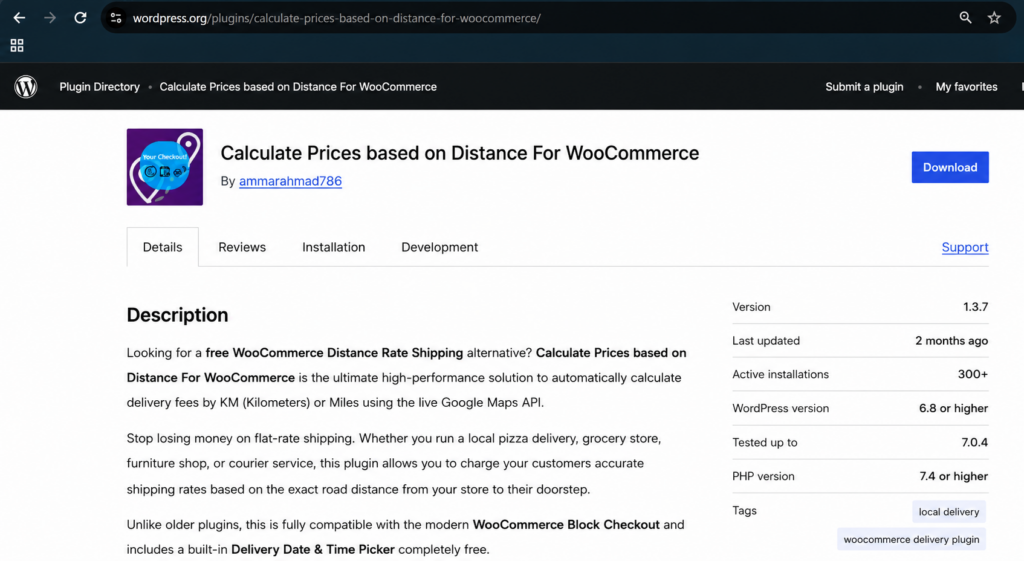
The Calculate Prices based on Distance For WooCommerce plugin eliminates technical barriers through intuitive distance based shipping WooCommerce setup using visual interfaces and step-by-step configuration. This transforms complex shipping calculations into simple point-and-click operations that any store owner can master without coding knowledge.Below is the plugin page on wordpress.org.
Manual Coding vs Distance Based Shipping WooCommerce Plugin
| Manual Coding Approach | Distance Based WooCommerce Plugin |
|---|---|
| Requires PHP knowledge | Visual configuration — no coding needed |
| Hours of development time | Quick setup under an hour |
| Error-prone customization | Tested and reliable distance calculation |
| Limited flexibility | Unlimited customization options |
Free vs PRO of the plugin
Free Version:
✅ Distance-Based Pricing — Automatically calculate delivery charges based on real driving distance
✅ Google Maps Address Autocomplete — Real-time address suggestions for better accuracy
✅ Charge Per KM or Mile — Fully customizable delivery charges based on preferred unit
✅ Delivery Date and Time Picker — Allow customers to choose preferred delivery slots
✅ Live Calculation Display — Customers see exact delivery fee instantly at checkout
✅ Block and Classic Checkout — Compatible with both WooCommerce checkout types
✅ Lightweight and Easy to Set Up — Designed for store owners and non-developers
PRO Version:
⚡ Advanced Pricing Rules — Create tiered distance based shipping WooCommerce brackets (e.g., $5 for 0–5 KM, $10 for 5–15 KM)
⚡ Maximum Delivery Distance — Restrict deliveries beyond a certain radius
⚡ Store-to-Store & Custom Dual Addresses – Calculate delivery rates between two completely custom locations (perfect for point-to-point courier services)
⚡ Force Checkout Address Verification – Prevent orders from processing until an accurate distance rate has been queried
⚡ Admin Label Customization — Rename plugin labels for better customer UI experience
⚡ Free Delivery Threshold — Automatically waive delivery fee above a cart total
How to Set Up Distance Based Shipping WooCommerce — Step by Step
Step 1: Install the Free Plugin
In WordPress go to Plugins → Add Plugin, search “Calculate Prices based on Distance For WooCommerce” then Install and Activate. Or download directly from WordPress.org.
Step 2: Get Your Google Maps API Key
Create two API keys in Google Cloud Console. Follow our guide: How to Get Google Maps API Key
Step 3: Configure Distance Based Shipping WooCommerce Settings
Enter your store address and set your distance units. Follow our complete guide: Step-by-Step Setup Guide
Step 4: Enable PRO Features
Add tiered pricing, max delivery radius. PRO configuration guide
Step 5: Test at Checkout
Visit your checkout page, enter a test delivery address and click Calculate Delivery Fee. The exact distance based fee will be applied instantly.
Watch our setup video for visual guidance and learn how our plugin works.
Distance Based Shipping WooCommerce FAQ
How do I set up distance based shipping WooCommerce without coding?
Install Calculate Prices Based on Distance For WooCommerce from WordPress.org. Add your Google Maps API keys, enter your store address, set your price per km or mile and the plugin handles all calculations automatically. No coding needed.
Can I modify distance based shipping WooCommerce settings after going live?
Yes, all settings remain fully editable at any time without affecting existing orders.
Is Google Maps API required for distance based shipping WooCommerce?
Yes but Google provides 10,000 free requests per month which covers most small store needs. Most stores never pay anything for the API.
Does distance based shipping WooCommerce work with Block Checkout?
Yes. The plugin is fully compatible with both Classic and Block-based WooCommerce checkout.
What is the difference between free and PRO distance based shipping WooCommerce?
The free version charges a single rate per km or mile. The PRO version adds tiered pricing brackets, maximum delivery radius, dual address fields, and Free Delivery Threshold.
How long does it take to set up distance based shipping WooCommerce?
Most store owners complete the full setup under an hour following our Step-by-Step Setup Guide.
Start Using Distance Based Shipping WooCommerce Today — Free
Stop losing money on flat rate delivery. Set up distance based shipping WooCommerce quickly with our free plugin — no coding required.
Last Updated: Sep 2026