
Set Delivery Time and Date in WooCommerce with One Plugin
To set delivery time and date in WooCommerce without headaches, you need one plugin that handles scheduling and pricing together instead of stitching together separate tools. Store owners worldwide struggle with complex plugin combinations that create conflicts, slow down websites, and frustrate customers during checkout. Our Calculate Prices Based on Distance For WooCommerce plugin solves this by letting you set delivery time and date in WooCommerce alongside intelligent distance-based pricing, in one solution.
Table of Contents
- Why Multiple Plugins Create WooCommerce Problems
- How to Set Delivery Time and Date in WooCommerce with One Plugin
- Test the Plugin Live
- Free vs PRO Plugin Features
- Setup Guide
- Common Delivery Time Questions Answered
Why Multiple Plugins Create Problems When You Try to Set Delivery Time and Date in WooCommerce
Managing delivery time and date in WooCommerce with separate plugins creates several critical issues:
Plugin Conflict Nightmares: Different plugins often conflict with each other, causing checkout errors, broken functionality, and frustrated customers who can’t complete purchases.
Complex Maintenance Overhead: Updating multiple plugins simultaneously risks breaking your entire delivery time system, requiring expensive developer intervention.
Inconsistent User Experience: Customers face confusing interfaces when different plugins handle pricing and scheduling separately, leading to abandoned carts.
Performance Issues: Multiple plugins slow down your website, especially during checkout when customers try to select their delivery time and date.
How to Set Delivery Time and Date in WooCommerce with One Plugin
The Calculate Prices Based on Distance For WooCommerce plugin makes it simple to set delivery time and date in WooCommerce by integrating everything into one streamlined solution:
Unified System Architecture: Our plugin handles both distance-based pricing calculations and delivery time scheduling through a single, optimized codebase that eliminates conflicts.
Real-Time Pricing Integration: Customers see accurate delivery costs instantly while they set delivery time and date in WooCommerce, creating transparency and reducing cart abandonment.
Seamless Checkout Experience: The integrated datepicker and timepicker work natively with both WooCommerce Classic and Block checkout, so customers can set delivery time and date in WooCommerce without any friction.
Automatic Distance Calculations: Google Maps integration provides precise driving distances for accurate pricing while customers choose their delivery time and date.
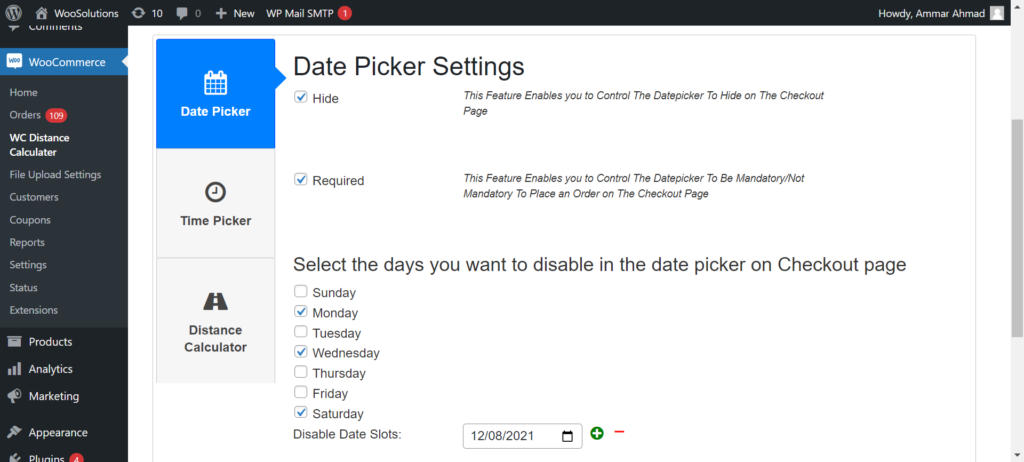
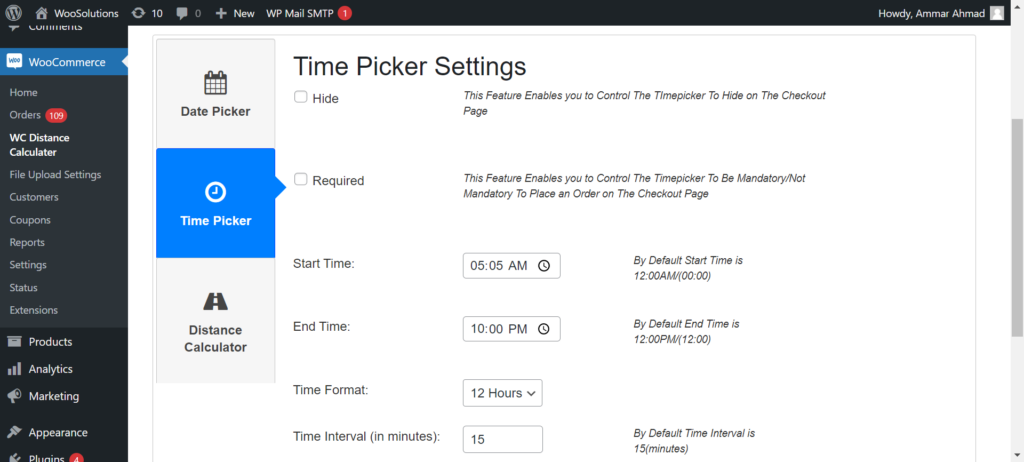
Here’s what it looks like when you set delivery time and date in WooCommerce from the admin panel — simple toggles, no code required:
Free vs PRO Plugin Features
Free Version Capabilities: Download Now
- Distance-based pricing calculation – Automatically calculate delivery charges based on real-world driving distance
- Google Maps address autocomplete – Provides address suggestions in real time
- Flexible charge per kilometer or mile – Fully customizable delivery charges based on preferred unit
- Integrated delivery datepicker & timepicker – Set delivery time and date in WooCommerce with ease
- Live calculation display at checkout – Customers see calculated delivery charges instantly
- Universal WooCommerce compatibility – Works seamlessly with WooCommerce Classic & Block checkout
- Lightweight setup process – Designed for store owners and non-developers
PRO Version Advanced Features: Buy Now
- Advanced Pricing Rules – Create tiered pricing brackets (e.g., $5 for 0–5 KM, $10 for 5–15 KM)
- Maximum Delivery Distance – Restrict deliveries beyond a certain radius
- Dual Address Fields – Allow pricing between two locations (e.g., pickup & drop-off)
- Free Delivery Threshold by Cart Total – Offer free shipping by distance once a user spends a specific amount (e.g., Free delivery over $100 within a 10km radius).
- Admin Label Customization – Rename plugin labels for better customer UI experience
Test the Plugin Live (Free vs PRO Comparison)
Want to see it in action before installing? Try the live demo and set delivery time and date in WooCommerce yourself, comparing Free and PRO features side by side:
Setup Guide
Start by installing the free plugin from WordPress.org. Then follow our complete setup tutorials:
Step 1: Get your Google Maps API Key
Step 2: Configure your plugin for distance-based shipping
Step 3: Enable PRO features like tiered pricing
Learn how our plugin works.
Video Walkthrough
Watch how to set delivery time and date in WooCommerce in this quick walkthrough:
Common Questions About How to Set Delivery Time and Date in WooCommerce
Q: Does the plugin include time slot capacity management or prevent double-booking?
A: The current version lets you set delivery time and date in WooCommerce through datepicker and timepicker fields. For advanced capacity management and slot restrictions, you would need to combine it with dedicated booking plugins.
Q: Will it integrate with my existing WooCommerce theme?
A: Yes! The plugin is designed to be compatible with all major WooCommerce themes and page builders like Elementor, Divi, and Gutenberg.
Q: Do I need coding skills to use this plugin?
A: No! It’s 100% beginner-friendly. Just install, add your Google Maps API key, set pricing rules, and you’re ready to go.
Q: Is Google Maps API required? What if I don’t have billing set up?
A: Yes, Google Maps API is required for distance calculation and autocomplete features. API billing is required but Google offers free monthly credits, enough for most stores.
Set Delivery Time and Date in WooCommerce Today
Stop struggling with plugin conflicts and complex setups. Our Calculate Prices Based on Distance For WooCommerce plugin gives you everything you need to set delivery time and date in WooCommerce, all in one reliable solution.
Ready to get started? Try the live demo, install the free plugin from WordPress.org, or upgrade to PRO for advanced scheduling features.
Need assistance with setup? Contact our support team for personalized help, or visit RoutePricing.com for complete guides.