
The Complete Guide to Google Maps API for WooCommerce Shipping
Table of Contents
Why Distance-Based Shipping Matters for WooCommerce
Traditional flat-rate WooCommerce shipping fees create unfair pricing. Local customers pay too much while distant customers pay too little. This is exactly the problem Google Maps API for WooCommerce shipping solves, and the Calculate Prices Based on Distance for WooCommerce plugin makes it simple to implement without writing a single line of code.Below is the plugin page on wordpress.org.
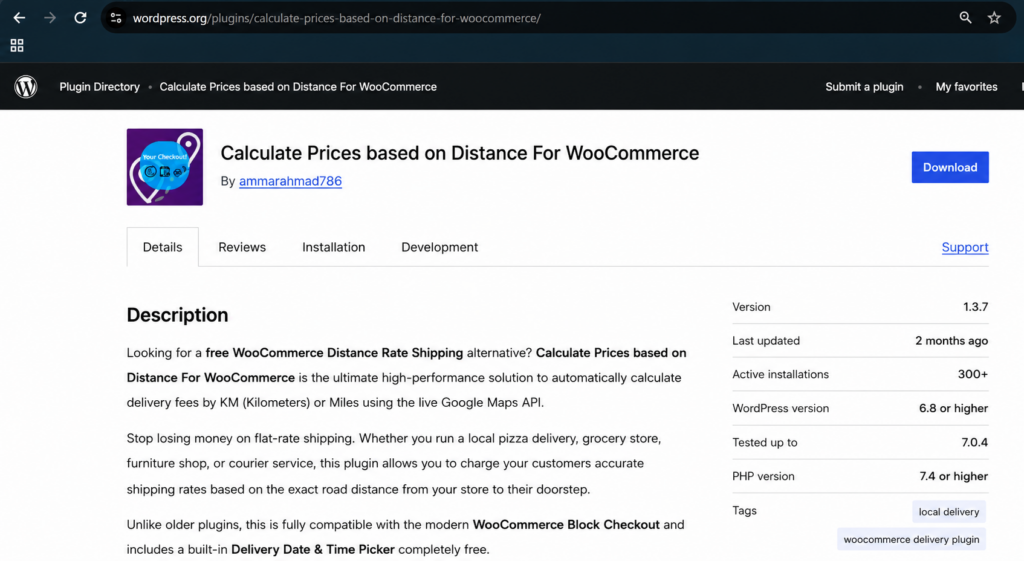
WooCommerce Distance Calculator – shipping calculation based on real driving distance
Key Benefits:
- Fair pricing: Customers pay based on actual delivery distance
- Increased conversions: Transparent shipping cost WooCommerce reduces cart abandonment
- Profit protection: Avoid losing money on long-distance deliveries
- Customer satisfaction: Clear estimate shipping cost for WooCommerce builds trust
Getting Your Google Maps API Key for WooCommerce Shipping
Setting up Google Maps API for WooCommerce shipping requires a valid API key. Here’s the quick process:
Required Google APIs:
- Routes API (Essential) – Calculates optimal geographic paths
- Geocoding API – For address validation
- Places API – For address autocomplete
- Maps JavaScript API – For map displays
- Directions API – For route optimization
Note: Google requires billing setup but offers generous free monthly credits for most stores.
Need detailed help? Follow our complete Google Maps API key guide for WooCommerce integration.
Setting Up Google Maps API for WooCommerce Shipping Calculation
The shipping rates calculator for WooCommerce setup is straightforward with our plugin:
Installation Process:
- Install Plugin – or Download from WordPress.org
- Activate Plugin – Go to WordPress > Plugins >Add plugin > search Calculate Prices based on Distance For WooCommerce > install and activate
- Configure Settings – Navigate to WooCommerce > WC Distance Calculator
- Add API Keys – Enter your Google Maps API keys
- Set store location – Enter your origin address in the plugin settings
- Set Pricing Rules – Define price per kilometer/mile
- Test Calculator – Verify delivery cost calculations
The plugin is 100% beginner-friendly – no coding skills required!
See how distance-based delivery pricing works: How Distance Calculator Works
Free Version Features:
- Distance-Based Pricing – Automatically calculate delivery charges based on the distance between your store and the customer’s address.
- Google Maps Address Autocomplete – Provides address suggestions in real time, improving checkout speed and accuracy.
- Charge Per Kilometer or Mile – Fully customizable delivery charges based on preferred unit.
- Delivery Datepicker & Timepicker – Allow customers to choose preferred delivery date and time.
- Live Calculation Display at Checkout – Customers see calculated delivery charges instantly.
- Works Seamlessly with WooCommerce Classic & Block Checkout – Full compatibility with both checkout types.
- Lightweight & Easy to Set Up – Designed for store owners and non-developers.
Get started: Free Version Step-by-Step Guide
Advanced Shipping Rate Configuration
The PRO version offers powerful WooCommerce shipping rates customization on top of the standard Google Maps API for WooCommerce shipping setup:
PRO Features:
- Advanced pricing rules: Tiered pricing brackets (e.g., $5 for 0-5 KM, $10 for 5-15 KM)
- Maximum delivery distance: Restrict deliveries beyond certain radius
- Store-to-Store & Custom Dual Addresses – Calculate delivery rates between two completely custom locations (perfect for point-to-point courier services)
- Free Delivery Threshold by Cart Total – Offer free shipping by distance once a user spends a specific amount (e.g., Free delivery over $100 within a 10km radius)
- Admin label customization: Rename plugin labels for better UI
- Force Checkout Address Verification – Prevent orders from processing until an accurate distance rate has been queried
Upgrade benefits: PRO Version Configuration Guide
Video Walkthrough
Watch this quick walkthrough on setting up Google Maps API for WooCommerce shipping:
FAQ: Google Maps API for WooCommerce Shipping
Q: Do I have to pay for the Google Maps API to use it with WooCommerce shipping?
A: Google requires billing to be set up, but it provides free monthly credits that comfortably cover most small to medium WooCommerce stores.
Q: Which Google Maps APIs do I actually need to enable?
A: You need the Maps JavaScript API, Places API, Geocoding API, Directions API and Routes API enabled in your Google Cloud project for the plugin to work correctly.
Q: Is my Google Maps API key secure with this plugin?
A: Yes. The plugin uses a dual API key security system with domain restrictions, so your key can’t be misused even if it’s exposed on the frontend.
Q: What happens if my Google Maps API key stops working?
A: Shipping calculations will stop updating until the key is fixed. Check for billing issues, quota limits, or restricted API permissions first — these cause most key errors.
Q: Do I need a developer to set up Google Maps API for WooCommerce shipping?
A: No. The plugin is built for non-developers — you paste your API key into the settings and the plugin handles all the calculation logic automatically.
Getting Started Today
Transform your WooCommerce shipping calculation with distance-based pricing:
- Download the free plugin
- Get API key following our detailed guide
- Configure rates using our setup instructions
- Test thoroughly before launching live
Ready to Optimize Your Shipping?
Visit RoutePricing.com to learn how our WooCommerce distance rate shipping solution can boost your store’s profitability while improving customer satisfaction.
Questions? Contact us for expert guidance on implementing Google Maps API for WooCommerce shipping in your store.