
A WooCommerce shipping calculator figures out delivery cost automatically at checkout, instead of forcing you to guess at a flat rate or hand-draw shipping zones that never quite match reality. The right one uses real driving distance, updates live as customers type their address, and keeps your delivery pricing fair on every single order — whether the customer lives two blocks away or twenty kilometers out.
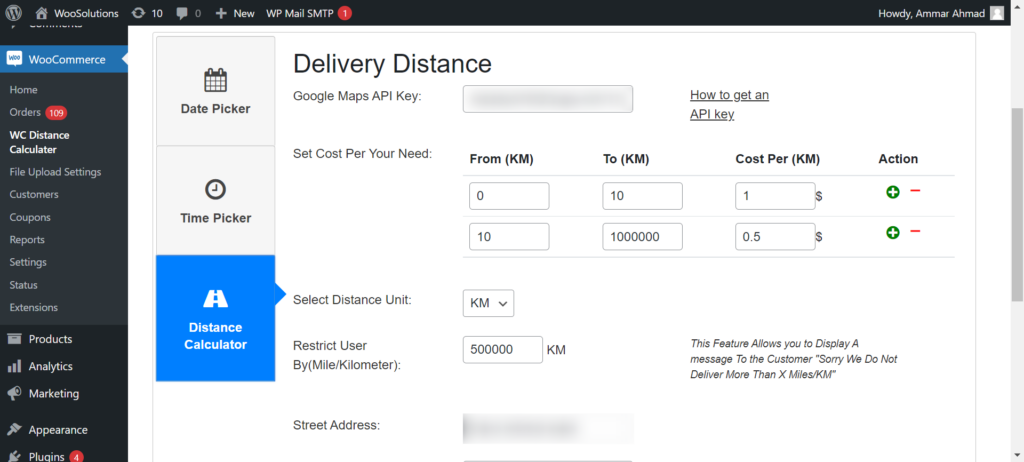
Table of Contents
- Why Every Local Store Needs One
- 7 Features the Best One Has
- How This Tool Works
- Free vs PRO Features
- Setup Guide
- FAQ
Why Every Local Store Needs a WooCommerce Shipping Calculator
Without a proper WooCommerce shipping calculator, most stores fall back on one flat delivery fee for everyone. That means a customer two kilometers away pays exactly the same as one thirty kilometers away — so you’re either overcharging nearby buyers or losing money on every distant order. This approach fixes it by pricing each delivery based on actual distance, which keeps pricing fair and protects your margins at the same time.
7 Features the Best WooCommerce Shipping Calculator Has
1. Real Driving Distance, Not Straight-Line Estimates
A good delivery calculator uses actual road routes via Google Maps, not a straight-line radius that ignores rivers, highways, and one-way streets.
2. Live Price Updates at Checkout
The calculated fee should update the moment a customer finishes typing their address, not after they click through multiple checkout steps.
3. Address Autocomplete
Google Maps autocomplete reduces address entry errors, which keeps calculations accurate on the first try instead of failing on typos.
4. Flexible Rate Configuration
You should be able to set your own price per kilometer or mile, not be locked into a preset rate that doesn’t reflect your fuel and labor costs.
5. Tiered or Bracket Pricing Options
The strongest tools let you set different rates for different distance ranges, so pricing scales sensibly instead of one flat multiplier.
6. Block and Classic Checkout Support
Many older shipping plugins only work with Classic checkout. Make sure yours also works with the newer Block checkout.
7. Maximum Delivery Distance Control
A capable delivery calculator lets you cap deliveries beyond a set radius, so you’re never accidentally committing to an unprofitable long-distance order.
How This WooCommerce Shipping Calculator Works
The Calculate Prices Based on Distance For WooCommerce plugin is a complete WooCommerce shipping calculator built around real driving distance. Once installed, it connects to the Google Maps API to calculate the exact route between your store and the customer, then applies your configured rate — flat, per-km, or tiered — automatically at checkout with no manual work on your end.
Free vs PRO Features of this plugin
Free Version – Download Now
- Distance-based pricing – Automatically calculate delivery charges based on real-world driving distance
- Google Maps address autocomplete – Provides address suggestions in real time
- Charge per kilometer or mile – Fully customizable delivery charges based on preferred unit
- Delivery datepicker & timepicker – Allow customers to choose preferred delivery date and time
- Live calculation display at checkout – Customers see calculated delivery charges instantly
- Works seamlessly with WooCommerce Classic & Block checkout – Full compatibility with both checkout types
PRO Version – Upgrade here
- Tiered pricing brackets – Create multiple distance-based rate levels (e.g., $5 for 0–5 KM, $10 for 5–15 KM)
- Maximum delivery distance – Restrict deliveries beyond a certain radius
- Free Delivery Threshold by Cart Total – Offer free shipping by distance once a user spends a specific amount (e.g., Free delivery over $100 within a 10km radius)
- Admin label customization – Rename plugin labels for better customer UI experience
- Force Checkout Address Verification – Prevent orders from processing until an accurate distance rate has been queried
Setup Guide
Step 1: Install the Free Plugin
In WordPress go to Plugins → Add Plugin, search “Calculate Prices based on Distance For WooCommerce” then Install and Activate. Or download directly from WordPress.org.
Step 2: Get Your Google Maps API Key
Create two API keys in Google Cloud Console — one public key and one private key. Follow our guide: How to Get Google Maps API Key
Step 3: Set store location
Enter your origin address in the plugin settings.
Step 4: Set Your Distance unit
Select KM or Mile as your distance unit and enter your price per unit.
Step 5: Enable PRO Tiered Pricing
Add distance brackets and set a maximum delivery radius to protect margins. PRO configuration guide
Step 6: Test at Checkout
Visit your checkout page, enter a test delivery address and click Calculate Delivery Fee. The exact fee will be applied instantly.
Test the Plugin Live (Free vs PRO Comparison): Try Live Demo
Video Walkthrough
See the plugin in action:
FAQ: WooCommerce Shipping Calculator
Q: Is Google Maps API key required for this WooCommerce shipping calculator?
A: Yes. Google requires billing to be set up, but provides free monthly credits that cover most small to medium stores comfortably.
Q: Does it work with international addresses?
A: Yes, the calculator supports worldwide addresses with local currency and distance unit conversion.
Q: Will it slow down my checkout page?
A: No, calculations run asynchronously in the background, so checkout speed isn’t affected.
Q: Can I switch between kilometers and miles?
A: Yes, it lets you choose your preferred unit in settings at any time.
Need help with setup? Contact our support team. Visit RoutePricing.com for complete guides.